
Published on: 15/09/2025 · Last updated on: 21/09/2026
Reasonable adjustments for inclusive teaching
The following practical actions will make a meaningful difference for students with a range of disabilities, specific learning difficulties, and long-term health conditions, whilst also improving the learning experience for everyone. You may already be using some of them. Please take time to review them and plan how you will build them into your provision.
These adjustments are a course requirement from the start of academic year 2026/27 and are the responsibility of all staff involved in the delivery of teaching, learning and assessment. Consult our events calendar for further support.
Framework for Reasonable Adjustments
Under the Equality Act 2010, universities have an anticipatory duty to make reasonable adjustments for disabled students. An anticipatory approach means proactively considering likely barriers to learning for students with disabilities and what reasonable adjustments can be put in place in advance to address these, as well as having processes in place to support further individual adjustments where required (e.g. via Disability Action Plans).
The University’s Framework for Reasonable Adjustments sets out three levels. Level 1 is an ‘inclusive by design’ approach whereby consistent actions can benefit all students and avoid the need for a DAP for many individuals. Levels 2 and 3 provide for individualised actions for students with greater support needs. Taking this approach can reduce the number of students who require Disability Action Plans (DAPs), whilst also benefiting those who may not disclose a disability or may not yet have a diagnosis.
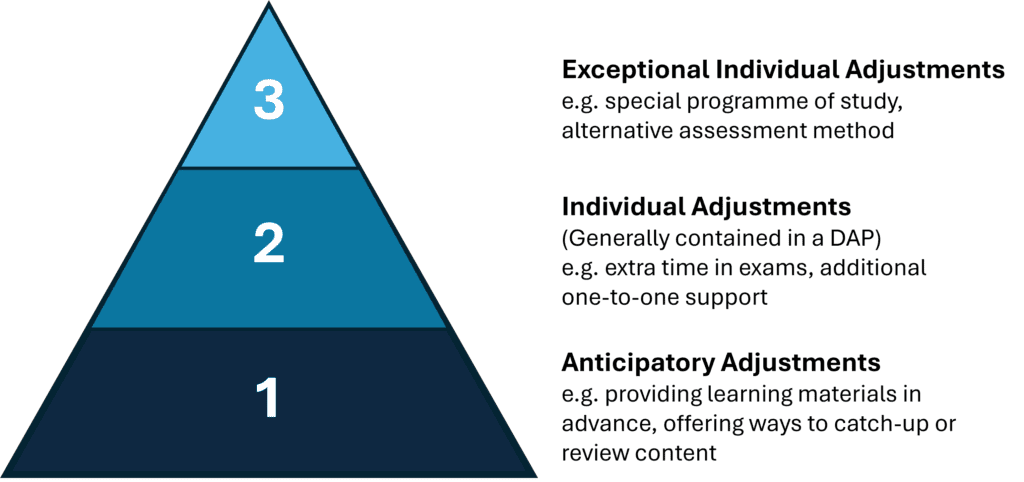
Where students have individual support needs they can be referred to the Disability Services team for discussions about reasonable adjustments at Level 2 or 3 of the framework.
1. Provide accessible teaching, learning and assessment materials:
Provide all digital materials and multimedia content in an accessible format, following good accessibility guidance.
Make available key teaching and learning materials no later than 24 hours in advance: course/unit level materials before the first taught session (e.g. course handbooks, reading lists, glossaries), and session level materials before individual lectures, seminars, labs etc. (e.g. slides, handouts, instructions).
Make available key assessment materials in advance of the start of coursework assessment. This should include: the assessment brief (using the standardised template defined by your Faculty/School), marking criteria and/or rubric, and information on submission format, deadlines, and submission method, and/or assessment conditions.
Use the University Library’s reading list management system, ‘Library Lists’, for all taught units with a reading list or any required reading, and ensure each Library List is linked from the corresponding Moodle space.
Provide accessible materials:
What does ‘accessible’ mean?
For students, accessible means being able to use materials in ways that suit them – whether that’s with assistive technologies or to meet personal needs. In practice, this starts with choosing an appropriate format and applying the SCULPT principles, supported by accessibility checkers. While these steps won’t guarantee 100% accessibility in every case, they give a strong, practical foundation for creating inclusive content. If you need more information on mathematics/statistics accessibility please refer to CLT’s information on STEM accessibility.
If your original document is created in an accessible format, using appropriate headings and structure, then students can use SensusAccess, embedded in Moodle, to convert the document to a format that is most suitable for them.
Where should I start/what should I prioritise when it comes to making digital materials accessible?
Start by understanding the basics: choose an accessible format, apply the SCULPT principles, and use built-in accessibility checkers to review your work. These steps will give you the biggest impact early on and help you build good practices. Download a single page SCULPT cheat sheet for easy reference.
Will using the in-built accessibility checkers in Microsoft products be sufficient?
Accessibility checkers in Microsoft tools (like Word, PowerPoint, and Excel) are a helpful starting point, as they can quickly identify common issues. However, checkers miss more nuanced issues and can’t judge whether something is meaningfully accessible – for example, whether link text makes sense, headings are used logically, or alternative text is appropriate for its context. Always use accessibility checkers alongside the SCULPT principles and guidance.
For more information see our guide to accessibility checkers page.
How do I identify and fix accessibility issues in Moodle?
Use the Accessibility+ toolkit to quickly identify common issues. Then apply SCULPT principles and carry out brief manual checks to ensure content is clear and meaningful, as automated tools can miss some issues.
What should I do if I use LaTeX?
Whilst SCULPT is the focus for general accessibility, we know that this will not fully cover all STEM content. Further support and guidance is currently being developed to support staff in taking a sensible and measured approach. Unit Convenors are being asked to complete an ‘adoption readiness checklist’ by September 2026, which specifically asks about complex material and notation. We will work closely with colleagues and departments to provide targeted support.
It should be noted that PDFs generated from LaTeX are not digitally accessible, so you must also provide an accessible version of the content such as an html version. This could be done by creating materials in Markdown-based tools (e.g. Quarto, Bookdown), using Microsoft Office, or a LaTeX converter. For more information see our page on accessible LaTeX workflows.
What if I provide handwritten items, notes or annotations? Do these need to be fully accessible too?
Handwritten materials can be shared, but an accessible version must also be available (e.g. typed notes or a summary). This could be accessible formats of a worked solution, a typed summary or key points.
How do I make slides with text, images, and data accessible?
Use large, clear fonts and ensure good contrast, avoiding combinations like red/green or blue/yellow. When presenting data, use textures, line styles, or shapes as well as colour, and make sure legends are clear and easy to read. For images and graphics, include appropriate alt text. Where visuals are complex (e.g. charts or flowcharts) an alternative format (short text summary or a longer description) lets students access the key information.
For more information see our guide to creating accessible figures and diagrams.
If the students are following a textbook as part of the course, that they have access to in class and at home, and the powerpoint shown in the lesson shows a screenshot of the page that the students are working on, for convenience, is it OK to leave the screenshot in the powerpoint on Moodle?
Yes, but you should ensure the screenshot has appropriate alt text added that conveys the meaning of the image. This will aid anyone using a screenreader who is not able to see or read the screenshot. It also provides a fallback in case the image fails to load. Guidance on writing alt text is available.
Provide materials in advance:
What counts as ‘key’ materials?
‘Key’ is very often context specific and dependent on the learning outcomes, the subject discipline and the type of teaching and learning activities themselves. Because of this, staff are best placed to identify what constitutes key materials in their context. Ensure this is explicitly communicated to students to manage expectations and ensure they understand the rationale for this.
Key materials for assessment will be decided by your Faculty/School depending on their overall approach to assessment and feedback (e.g. which assessment brief templates/marking criteria/rubrics are used by the Faculty/School).
How do I avoid overloading students when providing materials in advance?
Whilst the provision of materials in advance enables students to prepare for and better plan for their learning, too much information all in one go can lead to information overload. To avoid this, consider releasing materials in advance over a period of time (e.g. linked to individual units/sessions) to stagger their release. Releasing ‘key’ information can also help manage info overload by prioritising some materials/essential information.
When exactly should I release materials?
No later than 24-hours in advance, but in line with Faculty/School/Departmental expectations. Consistency across a course team is beneficial to all students.
Provide assessment materials in enough time to enable students to plan and prepare for their assessment. For example, this might be before any relevant lectures so that students can consider the lecture material to help them decide which areas to focus on in their assessment.
This requirement also includes course documentation (e.g. course handbooks, etc) and reading lists, glossaries so that students are able to prepare based on their individual needs.
Do I need to provide my lecture slides in advance in full?
Unless you have a sound pedagogical reason not to, then provide your lecture slides in full. If you have a reason not to, you could provide learning outcomes, a warm-up task, a summary or overview of what will be covered.
Can I make last minute changes to my slides?
Last minute changes are often inevitable, particularly if you work in a discipline where content is likely to update and evolve in short timeframes. It is fine to make last-minute changes; make sure that students are aware that changes may occur to the slides. If major changes/additions are highlighted in the updated slides, this can then help to flag those changes to students.
Can I share slides from a previous year of delivery instead?
If the slides are written by you and the content is still relevant then you can share these. Inform the students they are not current and an updated version will be shared later. If the slides are written by someone else you will need to seek permission to use them. Be certain that sharing in this way will not lead to confusion between versions.
If I set pre-session learning tasks for my students, how far in advance should I provide my materials by?
This will depend on the nature of the task(s) and how long the task(s) might take. Ensure that the activity is clearly signposted in the course calendar, with open and close dates if appropriate so that students are aware that they need to schedule this in.
Does this requirement apply to guest lecturers delivering a session?
Explain to guest lecturers the benefit of providing their materials early, but if it is not possible for them to do so request a summary of the session to provide in advance. Communicate expectations around guest lectures in advance to your cohort.
How should I respond to students if they request answers to problems in advance?
Some students may benefit from seeing answers to problems in advance in order to check their learning and reflect on next steps. However, if there are sound pedagogical reasons for not providing answers, such as the value of working through this together as a class, then communicate this to students to manage expectations.
Using Library Lists:
How do I set up a Library List for my course or unit?
Full information and support for Library Lists is available from the Library. The Library’s Getting started – staff guide provides the best place to start and provides contact information if you would like further support.
What constitutes prioritised reading and why is it good to tag this?
Prioritised reading can support students’ depth of reading, for instance, thinking critically about the materials they engage with, and help students to avoid information overload. Use this function for key texts/articles/chapters or for specific excerpts to support students to navigate their reading effectively.
- SCULPT accessibility principles
- SCULPT cheat sheet (for download)
- Creating accessible materials in STEM and technical disciplines
- Add a folder (a group of files) to your Moodle space
- Add a file to your Moodle space
- Use clear labelling for your resource on Moodle (ie. Week 2 Prep – Review Before Class)
- Reuse Panopto recordings from previous years for this year’s cohort
- Share a Panopto recording with multiple cohorts
- Share a PowerPoint file from OneDrive
- Update relevant Library List(s)
- Library support for students and staff with disabilities
- STEM accessibility guidance
- Accessible formats enhance flexibility – materials can be used on multiple devices and across different contexts.
- Clear layouts, appropriate fonts, and flexible formats reduce cognitive strain and support understanding.
- Structured, clutter-free documents help maintain focus and improve engagement with key content.
- Accessible formats (e.g., alt text, screen reader–friendly docs) allow independent access to materials.
- Keyboard-navigable materials reduce barriers for those who cannot always use a mouse or standard input tools.
- Captions and transcripts for audio/video support understanding and equitable access.
- Plain English, visual supports, and definitions reduce language-based barriers and aid comprehension.
- Builds confidence, supports preparedness and consistency of approach.
- Reduces uncertainty and cognitive overload.
- Enables pre-annotation and easier processing of content.
- Supports planning around energy levels and flares.
- Enables preview of new or technical terminology that can be hard to lip read.
- Allows time to translate or review unfamiliar terms.
2. Provide asynchronous versions of live sessions that enable students to catch-up with or review taught content:
Use Panopto to provide recordings of live sessions, or, where this is not appropriate, provide alternative material that enables students to catch-up or review taught content (e.g. a session summary or edited recording). This applies to both online and in-person teaching sessions.
Which ‘live sessions’ does this apply to?
The adjustment applies to all live teaching sessions. However, this does not mean that all sessions must be recorded or that an equivalent alternative to attendance must be created in every case. The way the adjustment is implemented should be proportionate to the nature of the session and its intended learning outcomes, remembering that the intention is to support students to review or catch-up, not to be a substitute for, or equivalent to, actual attendance.
Do I need to record sessions where students are interacting with each other or engaged in tasks?
There will be contexts where it may not be feasible or appropriate to record a session, or parts of a session. For instance, in language classes where students are carrying out conversation practise, or in labs, or other forms of interactive tasks. You may also consider it inappropriate to record a part of a session where you feel being recorded may negatively impact your students confidence and willingness to participate in a discussion or other activity.
If it’s not pedagogically appropriate to record parts of your session then consider how you might enable students to review or catch-up with core learning content or tasks. This might include recording some of the session (e.g. where you are delivering content or explaining key concepts), whilst pausing the recording during group work or discussions. Alternatively you can edit out parts in Panopto after the session has taken place. Alternatively, you could provide a short summary video subsequent to the session, covering the key content and learning points, provide a written summary, annotated versions of materials, upload the tasks undertaken in class so that students can review them, or post alternative questions or tasks that an individual student looking to catch-up on a missed session could complete individually.
Do I need to record sessions where the material is of a sensitive nature and/or student discussions are likely to be of a sensitive/confidential nature?
You are able to decide whether you think it would be pedagogically appropriate to record sensitive materials or discussions. Panopto includes features to pause recordings to facilitate this situation, or you can edit out sections later. Examples of where it may be pedagogically appropriate not to record may include discussions of a sensitive nature, or that include sensitive personal data (e.g. racial/ethnic origin, religious or other beliefs, physical or mental health, sexual activities, criminal offenses).
It may be appropriate not to record a part of a session where you feel being recorded may negatively impact your students confidence and willingness to participate in a discussion or other activity.
Can I provide a previous year’s session recording instead
It is not normally permitted to re-use a recording from a previous year if it contains any images, voices or identifiable contributions from the previous group of students. However, if the material features you alone then reuse is generally permissible.
Further information on copyright considerations for learning and teaching is available.
What do I do if the recording, or part of it, fails?
Provide an alternative such as a session summary.
Do I need to record the live session, or can I pre-record the content prior to the live session being delivered?
You can provide a pre-recorded video of the content as an alternative to recording the live session.
Is there support for recording lectures?
DD&T run training sessions before the start of semesters to illustrate how to effectively use the microphones and other equipment in classrooms. Look out for announcements for these on the Staff Homepage. When recordings are processed in Panopto they are automatically captioned. It’s helpful to be aware during delivery that clarity of speech will improve the accuracy of the captions, however it also possible to edit the captions if needed, and guidance is provided by the TEL team. Recordings are available, according to the Recorded Teaching Policy, for 2 years following the year of recording.
What are some alternatives to recording?
Alternatives to typical teaching capture may include:
- Only capturing presentation screens (PC/Visualiser) with audio
- Recording the presentation slides with audio commentary
- The normal capture process with the camera pointed away from the presenter
- Pre-recorded versions of lectures
- Podcasts with notes
- Detailed notes accompanying lecture materials (for example, annotated slides)
Please be aware, as per the University’s Recorded Teaching Policy, alternatives to teaching capture will not be applicable if teaching recording is a requirement rather than a recommendation to ensure an individual student is not disadvantaged. This will be clearly stated in a student’s DAP.
How long should recordings be available for?
There are currently no institutional rules specifying minimum durations for recording availability. However, you should consider the role recordings play in helping students review and consolidate learning, revisit complex material, and prepare for assessments. Where recordings relate directly to assessed content, making them available for an appropriate period can support effective learning and revision.
Are there examples of alternative asynchronous materials for labs and seminars?
There is no expectation that seminars or labs must always be recorded. However, students should be provided with materials that enable them to review or catch-up with the key concepts or activities they missed. Depending on the context, this might include providing:
- slides or instruction sheets used in the session.
- a summary of key concepts, themes or activities covered.
- links to relevant readings, videos or other resources.
- guidance on any preparation needed for subsequent sessions.
How this adjustment is made will require consideration of the specific context including the size, format, content, and intended learning outcomes of the relevant session.
Are recordings/alternatives expected for very small sessions? (e.g. dissertation supervision meetings)
For individual supervision meetings, there is normally no expectation that meetings will be recorded. For very small sessions such as dissertation or project supervision meetings, the adjustment should ensure that students have material relevant to the content and intended outcomes of the session. Given the nature of such meetings, it may be possible to co-create this material with students by supporting them to take relevant notes and agree action points as part of the session. These would then act as collectively agreed review material and it may be possible to share these with individuals who were unable to attend. In some cases, it may be appropriate to offer students the opportunity to meet one-to-one or during office hours to review or catch-up.
How might this apply to review sessions where there is no new taught content and the main aim is to enable students to feel comfortable to ask questions?
Where recording student contributions would discourage participation, it is not necessary to record student questions. Staff might instead:
- provide a written summary of common questions and answers, or
- pause recording while students speak and resume recording to provide a response, including a brief recap of the question, ensuring that student voices aren’t captured.
Will this adjustment undermine attendance at live sessions?
This adjustment is not intended to replace attendance at teaching sessions. Its purpose is to support students in reviewing learning from sessions they have attended and, where appropriate, catching up on learning they have unavoidably missed. The adjustment should not be understood as providing an equivalent alternative to attendance, nor does it remove any attendance requirements that apply to a programme, placement, accreditation requirement, or professional body expectation (in such cases, many departments already have approaches in place to support students who miss a mandatory session, such as offering repeat sessions).
Does this adjustment mean I need to provide additional one-to-one teaching or materials whenever a student misses a session?
The purpose of the adjustment is to ensure students have access to material that supports review or catch-up of key learning. In most cases this can be achieved through resources made available to the whole cohort. Additional individual support may occasionally be appropriate, but is not an expectation for every missed session. Where a student requires more regular individualised support, this should be part of an agreed approach taken at Level 2 of the Procedure.
- Scheduling recordings of your live lectures via Panopto.
- Reusing Panopto recordings from previous years for this year’s cohort.
- Sharing a Panopto recording with multiple cohorts.
- Options for recording videos using Panopto (including pre-recorded material)
- Guidance on adding notes to slides to explain visuals.
- Editing Panopto recordings.
- Copyright considerations when reusing recorded material.
- Using IT & AV equipment in learning spaces.
- Alternatives to standard Panopto lecture recording
- Podcasting and audio-only alternatives to video
- Useful for revision, catching up, and flexible learning. Can improve comprehension and memory as students can revisit lectures at their own pace/schedule.
- Allows pause/replay for note taking and supports information processing.
- Allows students to use their own assistive technologies to create accessible formats.
- Enables learning around health fluctuations.
- Can use captions/transcripts and watch at a suitable speed.
- Allows pause/replay on terms and concepts that are not familiar.
3. Teaching and assessment communication and delivery:
Use classroom microphones (where provided) at all times.
Inform students about changes to teaching arrangements via email (using the student unit mailing lists) and put an announcement on Moodle with as much notice as possible (e.g. for changes of venue or session cancellations).
Inform students about changes to assessment requirements, deadlines, or formats via email (using the student unit mailing lists) and put an announcement on Moodle with as much notice as possible.
Provide opportunities across the course for students to contact staff for support regarding teaching and assessment. This can include office hours, discussion forums and FAQs on Moodle.
Is there support for using equipment in classrooms?
DD&T run training sessions before the start of semesters to illustrate how to effectively use the microphones and other equipment in classrooms, look out for these being announced on the Staff Homepage. For further information see the Audio Visual Guide for teaching rooms and small theatres and the Audio Visual Guide – large lecture theatres.
How should I use the microphone in group work or discussion settings?
If participants are sharing back to the whole class, then ask them to use one of available microphones, or repeat the question/comment back to the whole group to ensure everyone has the opportunity to hear. This benefits anyone with a hearing impairment in the live session and also ensures live transcriptions and captions are picked up accurately.
Why should I inform students via email and Moodle?
Use the student unit mailing lists to inform students about changes to teaching arrangements. This will ensure that your message is delivered to all student inboxes in a timely fashion. It is also good practice to provide an announcement (forum post) through Moodle to confirm any change in arrangements. Forum posts arrive in inboxes according to personal notification preferences and therefore should not be relied upon for time-critical messages.
How should I inform students if assessment feedback is delayed?
As well as emailing the students with a revised date and posting to the Announcements forum in Moodle, the Unit Convenor has the option to add a Note to the Feedback Centre for that particular assessment (where applicable).
How do I set up a Moodle forum?
See our Moodle Forums – What are they? guide for more information.
- Setting up a Moodle assignment with a deadline, assignment details, and so that they appear in students’ dashboards on Moodle.
- Tips to connect prior knowledge to new learning.
- Using Moodle “Text and Media” activity to add contact details.
- Using student mailing lists to contact cohorts directly.
- Audio Visual guide for teaching rooms and small theatres
- Audio Visual guide for teaching in large lecture theatres
- Reduces time spent on clarification. Increases students’ self-reliance as they will be able to navigate through the information presented independently.
- Easier on navigation and memory. Predictable sequence lowers stress.
- Proper use of headings, lists, and alt text ensures accessible navigation and understanding.
- Enables easier scanning, comprehension, and note-taking with well-formatted and structured resources.
- Explicit organisation supports comprehension.
4. Plan for inclusive group work:
Consider group composition to avoid foreseeable barriers to participation.
Ensure group assessment tasks include a clear explanation of:
- the purpose of group work
- expectations around collaboration
- how individual and group contributions will be recognised or assessed.
What are some common foreseeable barriers to participation?
Whilst ‘freeloading’ is a common challenge with group work, there will be students who find participating challenging for very legitimate reasons. Some students may experience increased anxiety associated with group working if they feel more exposed to peer judgement, particularly if they have adapted and adjusted the way they work to meet their own learning needs. Some students may also experience an increased sense of being out of control when working with others. Some students may need to work with the group in ways that are more flexible, and a group that is very rigid (e.g. meeting at a set time and place) may create additional barriers for some students.
How can I strengthen group work assessment from the point of design?
Our Group Work Guide contains more detailed advice and guidance on designing effective group work assessment, including approaches to group composition.
Please read our wider guidance on reasonable adjustments for group work assessments.
- Structured rubrics and exemplars give clearer expectations.
- Advance information allows time for planning.
- Agency to pick assessment question can match cognitive strengths.
- Clear, literal criteria and consistent rubrics remove hidden rules, reduces decoding load, and can act as a checklist for students to stay on task.
- Predictable timelines support routine. Advance information enables planning.
- Early access to digital briefs means time for Braille/screen reader conversion.
- Clearer criteria and scaffolded assessment reduce hidden curriculum.
- Knowing expectations early reduces uncertainty. Agency in choice lowers performance pressure.
- Clear, literal criteria and consistent rubrics remove hidden rules and reduces decoding load.
5. Plan for inclusive oral assessment:
Oral assessment tasks should include a clear explanation of the format of the assessment and how the assessment will be marked.
What do we mean by ‘oral assessment’?
We mean any assessment that has an oral component to it, which could include presentations, debates, group discussions or vivas, amongst other formats.
Where can I go for more information?
Please read our wider guidance around reasonable adjustments for oral assessments.
- Clarity around tasks can reduce anxiety, especially where there is a performance element.
- Understanding the difference between marks for performance and marks for subject knowledge/application can help clarify priorities.
- Students who would typically avoid speaking publicly can be supported to develop communication skills in this area.
Find out more
If you require further support with implementing Level 1 Reasonable Adjustments in your teaching or assessment, please contact clt@bath.ac.uk. For further guidance on supporting individual student needs with DAPs, staff are encouraged to contact Disability Services.
The University is committed to supporting the diverse needs of all learners, including students with disabilities, long-term health conditions, and specific learning difficulties.
The University’s Disabled Students Policy and Procedure contains full details of the Framework for Reasonable Adjustments and expectations for students and staff.