
Published on: 30/06/2023 · Last updated on: 17/09/2026
Mahara Frequently asked questions
For more guidance you can access the Mahara Manual.
You can access context-specific help and tool tips from the Help icon when editing in Mahara.
Guidance for students is available in Mahara, in the Links and resources menu (Student Information and Mahara Basic Guide). Mahara Basic Guide covers all the basic functionality, and you can use it when you introduce Mahara to your students. It includes video tutorials and step-by-step guidance for quick and easy reference.
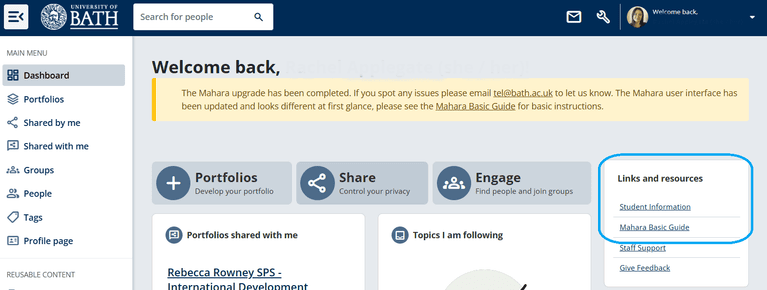
You can use this guide to support your students as they get familiar with the platform. During induction, make sure students know how to access the guide for future reference. The video tutorials are also available as a standalone Playlist. You can provide a link to the Playlist in your introduction for students, or embed in your Moodle space.
We recommend that you supplement this with tailored guidance about the purpose of your portfolio activity, expectations for engagement, assessment and feedback, and support for study skills such as reflection.
If you are expecting your students to include video resources, and embed these in a Mahara portfolio, you may also want to download and provide them with a copy of the Student Guide to Panopto.
The default portfolio storage limit is 100MB. The quota size has some flexibility and can be increased, but students must first ensure they have removed duplicate files or excessively large files. Mahara administrators are notified when a user nears their storage quota and will review storage quota and increase it if appropriate.
To display video content in an e-portfolio, students should store the video content in Panopto, and embed within the Mahara e-portfolio using an embed code.
Note about storage and videos: If students upload video files in Mahara (e.g., an MP4 file), this can very quickly use up the storage quota. Instead, videos should be stored in a suitable location and embedded to display in the portfolio. For assessed portfolios, it is recommended that students host video content in Panopto. Staff can create a Panopto Assignment folder to host student video content.