
1. Home
  2. Guidance
  3. Mahara
  4. Exporting Mahara portfolio content
  5. Exporting Mahara portfolio content

Exporting Mahara portfolio content

Published on: 30/06/2023 · Last updated on: 17/09/2026

How do students take their portfolio with them? 

  • Students can navigate to Export content under the Account menu at the top right (below the profile icon)
  • Selecting the relevant options, they can then click Generate Export. 
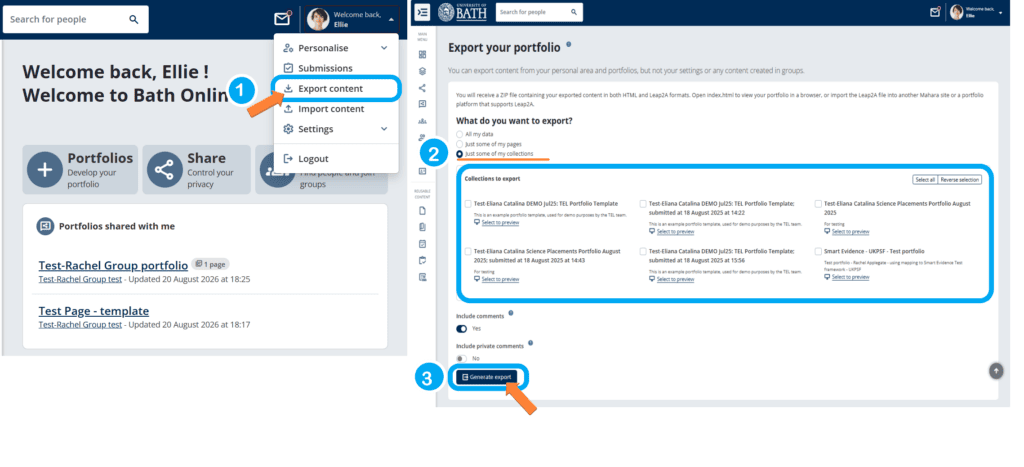
screenshot export process

This downloads a zipped folder of content that contains two methods for students to access their portfolio: 

  1. A self-contained HTML website with your portfolio data. You cannot import this again to Mahara, but it is readable in a standard web browser 
  2. A Leap2A XML format file. You can later use this to import your data into other Leap2A-compliant systems, although note the export is hard for humans to read. 

Staff should remind students to Export their portfolio content when they complete their portfolio activity or assessment, and before they graduate. Note the guidance about account duration and inactive accounts in the Mahara retention, archiving and back-up policy.

Note: Any work created or uploaded directly to a Group will not be included in the user’s exported portfolio. Therefore, if a user needs to include work from a Group they have worked in, they must copy it to their personal portfolio before exporting. 

Was this article helpful?

Related Articles