
Published on: 03/10/2023 · Last updated on: 04/06/2026
What to do
- Use the equation editor or LaTeX syntax to make maths accessible to screenreaders.
- Never use images of equations.
How to add equations in Moodle
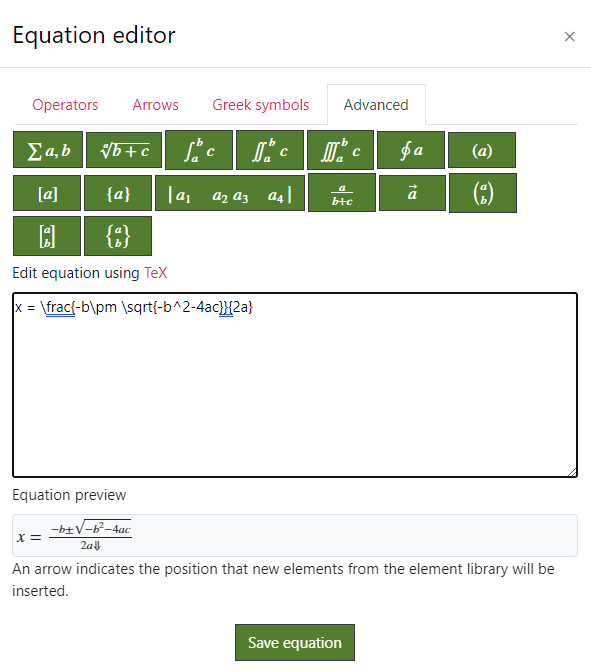
To insert an equation using the Moodle equation editor:
- Open the text editor’s Expanded view (second row of buttons).
- Select the Equation Editor (calculator icon).
- Either:
- choose symbols from the palette, or
- type LaTeX directly into the editor.

Writing LaTeX maths into Moodle
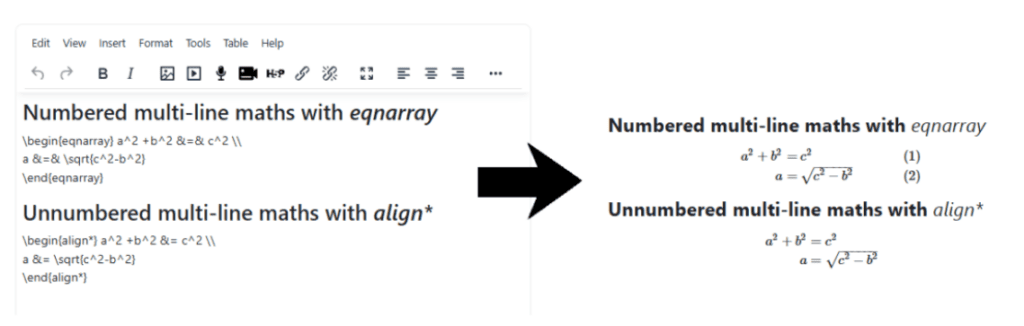
You can write LaTeX syntax directly in the text editor between \( … \) or \[ … \] for display maths.
For multi-line equations in Moodle, you can use the eqnarray or align environments using the “&” to control alignment as usual. For example:
Help with ‘Maths processing error’ in MathJax content
MathJax content can sometimes not display as expected, this may be due to the incorrect MathJax library being loaded. The following guide ‘How to fix Moodle content loading older MathJax libraries‘ may help.